Last updated July 23, 2026
Ever looked at a product online, added it to your cart, then left—only to see ads for that exact item everywhere you go? That’s dynamic remarketing at work.
It’s not just another marketing trick. It’s a powerful way to bring people back to your site and boost sales. Whether you want more conversions, better brand awareness, or repeat customers, dynamic remarketing can help.
This guide breaks it down. You’ll learn what dynamic remarketing is, how it works, how to set it up, and how to get the best results.
What is dynamic remarketing?
Dynamic remarketing shows personalized ads based on what someone did on your website or app. Unlike regular remarketing, which shows the same ad to everyone, dynamic ads display the exact products or services a person looked at.
Say someone browses your site, clicks on a pair of sneakers, but doesn’t buy. Later, as they scroll through other sites or apps, they see an ad with those same sneakers. That reminder can nudge them to come back and complete the purchase.
By using data like pages visited, items added to a cart, and abandoned checkouts, dynamic remarketing helps businesses reconnect with potential customers in a way that feels relevant and personal.
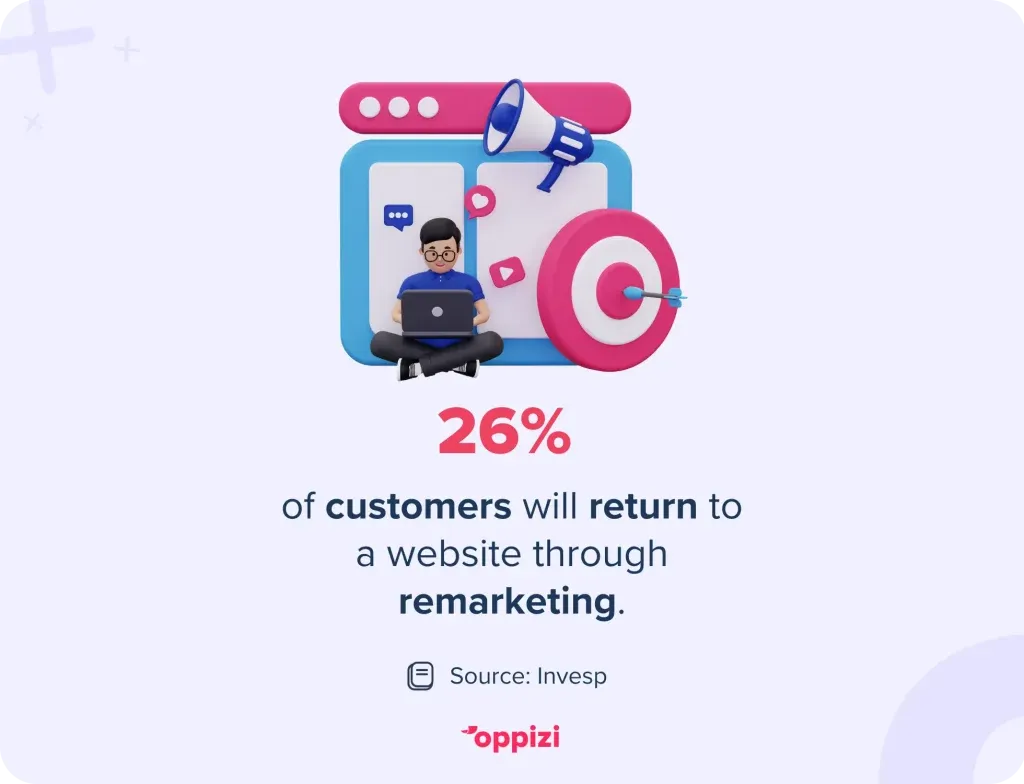
Twenty-six percent of customers return to a site through remarketing. This is a strong number, considering most visitors never come back without it. If someone is interested in a product, one look might not be enough. A reminder can encourage them to complete their purchase or sign up.
How does dynamic remarketing work?
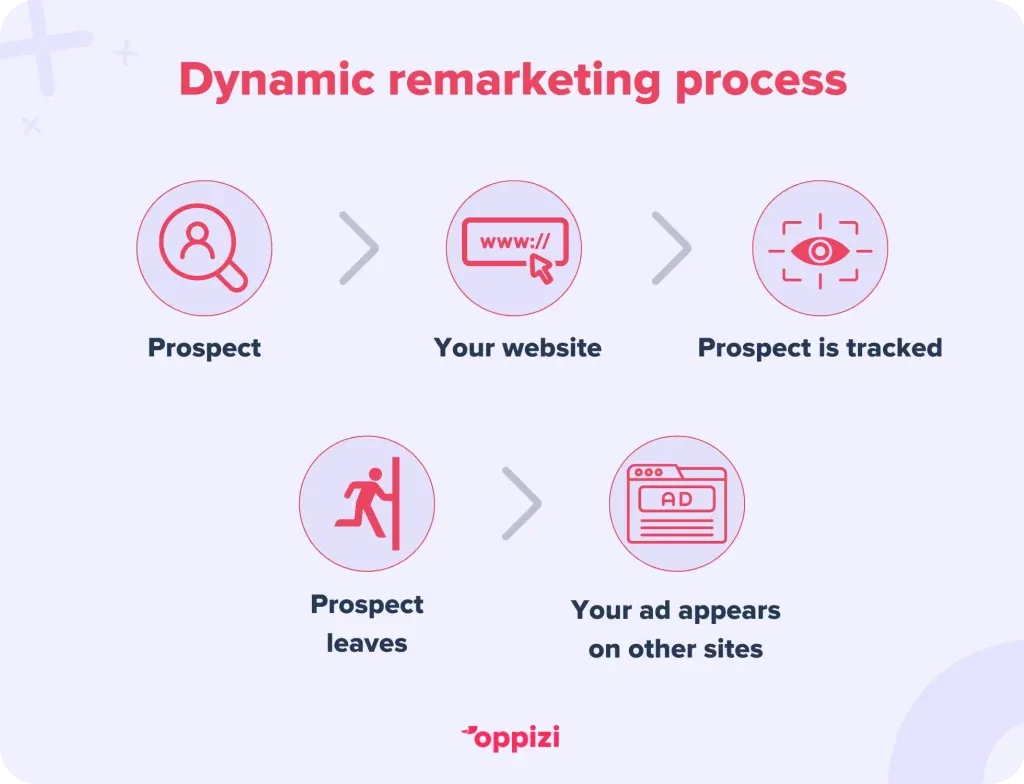
Dynamic remarketing uses data to show people ads for products they’ve already looked at. Here’s how it works:
Step 1: Track user behavior
First, you add a small piece of code (a remarketing tag) to your website. This tag tracks what people do—what pages they visit, what products they view, and whether they add items to their cart or start checkout.
Step 2: Create a product feed
Next, you set up a product feed. This is a list of the items you want to advertise, including names, prices, images, and links. Google Ads uses this information to create ads that match what people have browsed.
Step 3: Capture user data
When someone visits your site, the remarketing tag records their activity. If they look at a product or leave without buying, that information is saved and linked to them (usually through cookies).
Step 4: Generate ads
Google Ads then pulls product details from your feed to create personalized ads. These ads automatically update to match what each user has viewed.
Step 5: Show ads to the right people
Finally, these ads appear as people browse other websites or apps in the Google Display Network. Because the ads feature products they’ve already considered, they’re more likely to catch their attention and bring them back to buy.
Why use dynamic remarketing ads?
Dynamic remarketing helps bring back people who’ve already shown interest in your products. Here’s why it works:
1. Personalized ads
Instead of generic ads, people see the exact products or services they viewed on your site. This makes your ads more relevant and harder to ignore.
2. More engagement
People are more likely to click on ads that show products they’ve already considered. Remarketing ads can boost engagement by up to 400%.
3. Higher conversions
Since you’re targeting people who were already interested, they’re more likely to buy. An online tire retailer, Tirendo, increased its conversion rate by 161% using dynamic remarketing.
4. Cost-effective
Remarketing focuses on people who already know your brand, so it often delivers better results for less money. These ads typically cost between $0.11 and $0.50 per click, making them an affordable option.
5. Stronger brand recall
Even if someone doesn’t click right away, seeing your ads again and again keeps your brand in their mind. When they’re ready to buy, they’ll think of you first.
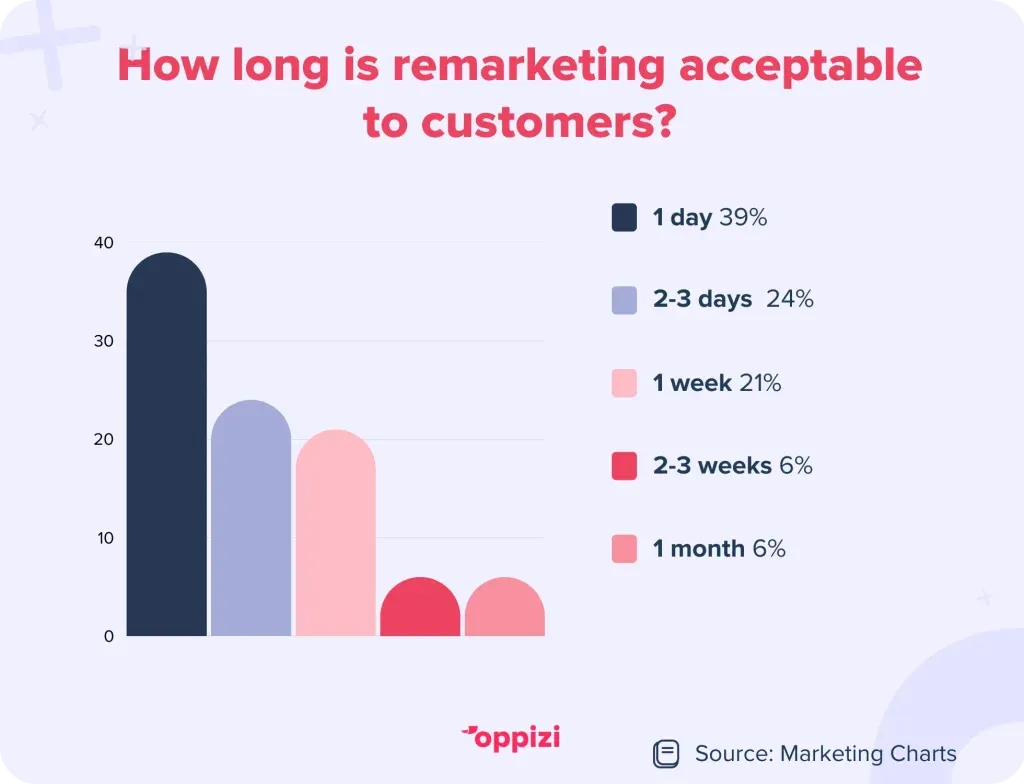
Not all consumers appreciate remarketing, but many do enjoy it. About 39% are okay with being targeted for 1 day, while 24% accept 2-3 days. Only 21% are fine with up to a week of remarketing. After that, most people aren't interested, with just 17% accepting remarketing for 2 weeks or longer.
How to set up dynamic remarketing in Google Ads
Getting started with dynamic remarketing is simple. Here’s what to do:
1. Set up a Google Ads account
If you don’t have one yet, create a Google Ads account. This is where you’ll manage all your ads.
2. Link Google Ads to Google Analytics
Connect Google Ads to Google Analytics. This helps track what people do on your site so you can target them better.
3. Add the remarketing tag
Install a small piece of code (the remarketing tag) on your website. This tracks what products people view, what they add to their cart, and whether they leave without buying.
4. Create a product feed
Make a list of the products you want to advertise. Include details like names, prices, images, and links. Keep it updated so your ads stay accurate.
5. Set up dynamic ads
Use Google Ads’ dynamic ad templates. These automatically pull product details from your feed and show the right ads to the right people.
6. Launch your campaign
Once everything’s ready, start your campaign. Your ads will follow people around the web, reminding them of the products they were interested in.
How to measure the success of dynamic remarketing
To see if your ads are working, track these key numbers:
- Impressions – How many times your ads show up.
- Click-through rate (CTR) – The percentage of people who click after seeing your ad.
- Conversion rate – The percentage of people who take action (like making a purchase) after clicking.
- Return on ad spend (ROAS) – How much revenue you make for every dollar spent.
- Cost per click (CPC) – The average cost of each ad click.
- Cost per acquisition (CPA) – How much you pay to get a new customer.
Checking these regularly helps you improve your ads and get better results.
Tips for better results
Want to make your remarketing ads more effective? Try these:
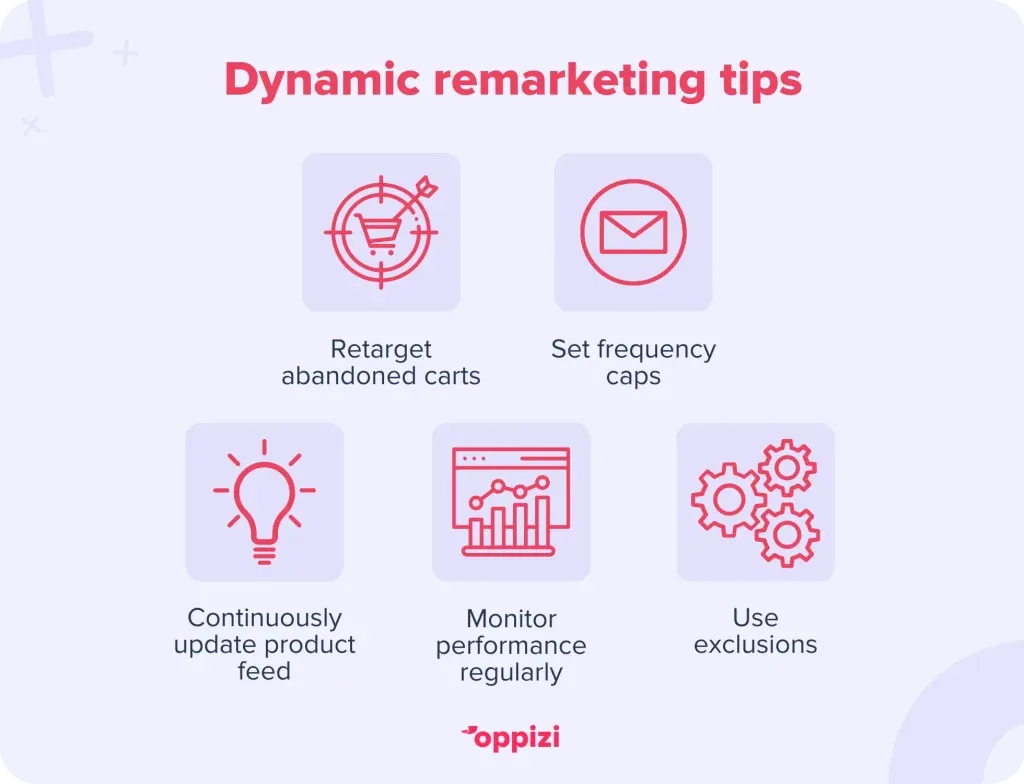
- Set frequency caps – Don’t overwhelm people with too many ads. Set limits.
- Retarget abandoned carts – Show special ads to people who left without buying. Offer discounts or free shipping to bring them back.
- Keep your product feed updated – Make sure your ads always show the right products and prices.
- Use exclusions – Stop showing ads to people who already bought. Focus on new customers.
- Monitor performance – Keep an eye on your results and tweak your ads to improve them.
Retargeting vs. remarketing
Retargeting and remarketing are terms that often get mixed up, but they mean different things in digital advertising. Here’s a simple look at how they differ:
Retargeting
- What it is: Retargeting shows ads to people who have already visited your website or app.
- How it works: It uses cookies to track what users do and displays targeted ads on other websites they visit.
- Purpose: The goal is to remind people about the products they looked at and encourage them to come back and make a purchase.
- Example: If someone browses your online store but doesn’t buy anything, they might see ads for those products on other sites later.
Remarketing
- What it is: Remarketing is a broader approach that includes different strategies to reconnect with customers, like email campaigns.
- How it works: It reaches out to users through channels like email, social media, or display ads based on their past actions.
- Purpose: The aim is to re-engage users who are interested in your brand and guide them back to your site.
- Example: If someone visits your site and signs up for your newsletter, they might get follow-up emails showing products they looked at and special offers.
In short, both retargeting and remarketing try to bring customers back, but retargeting mainly focuses on showing ads to past visitors, while remarketing uses various methods to reach out to potential customers.

Dynamic remarketing ads: FAQs
1. What are dynamic remarketing ads?
These ads show people the exact products or services they looked at on your site. If someone visits your store, adds a product to their cart, but doesn’t buy, they’ll see an ad for that same product while browsing other sites. This reminds them to come back and finish their purchase.
2. What’s the difference between retargeting and dynamic retargeting?
Both target people who’ve visited your site, but they work differently:
- Retargeting shows the same general ad to everyone, no matter what they looked at.
- Dynamic retargeting shows ads for the exact products or services someone viewed.
For example, if someone browses red sneakers and a backpack, a dynamic ad will show those exact items instead of a generic ad for your store.
3. How do I set up a dynamic remarketing campaign in Google Ads?
Here’s what you need to do:
- Create a Google Ads account (if you don’t already have one).
- Link Google Ads to Google Analytics to track user behavior.
- Add the remarketing tag to your website to collect data on what people view.
- Create a product feed with details like product names, prices, images, and links.
- Use dynamic ad templates in Google Ads to pull data from your feed.
- Launch your campaign so your ads start showing to past visitors.
4. What are dynamic ads?
Dynamic ads automatically adjust to show people the exact products or services they viewed on your site. They pull product details from a feed, so the ad updates based on each person’s interests.
For example, if someone looks at a blue sweater and a pair of jeans, their ad will show those exact items with images and prices.
5. What’s the difference between dynamic and non-dynamic ads?
The main difference is personalization:
- Dynamic ads are customized for each user based on what they viewed.
- Non-dynamic (static) ads show the same content to everyone, no matter what they looked at.
A static ad might promote your entire product catalog, while a dynamic ad will remind people of the exact items they considered. Dynamic ads feel more personal and are more likely to bring customers back.
Wrap-up
Dynamic remarketing helps you reach people who already showed interest in your products. It keeps your brand in front of them, increases engagement, and brings more sales.
Want to make an even bigger impact? Try combining online ads with offline marketing. Oppizi’s solutions can help you reach more people and drive new visitors to your site—giving you even more chances to re-engage them with dynamic ads.
Starting is a breeze. Simply follow the steps in this guide, apply the tips, and observe the transformation in your results. To expand your business effortlessly, partner with Oppizi Let us connect you with your customers in the real world, offline. Take the first step today.